

Science & Tech · Gadgets & EVs · 10 hrs ago
Googlebook OS stands out for touchscreen use, reviewer says
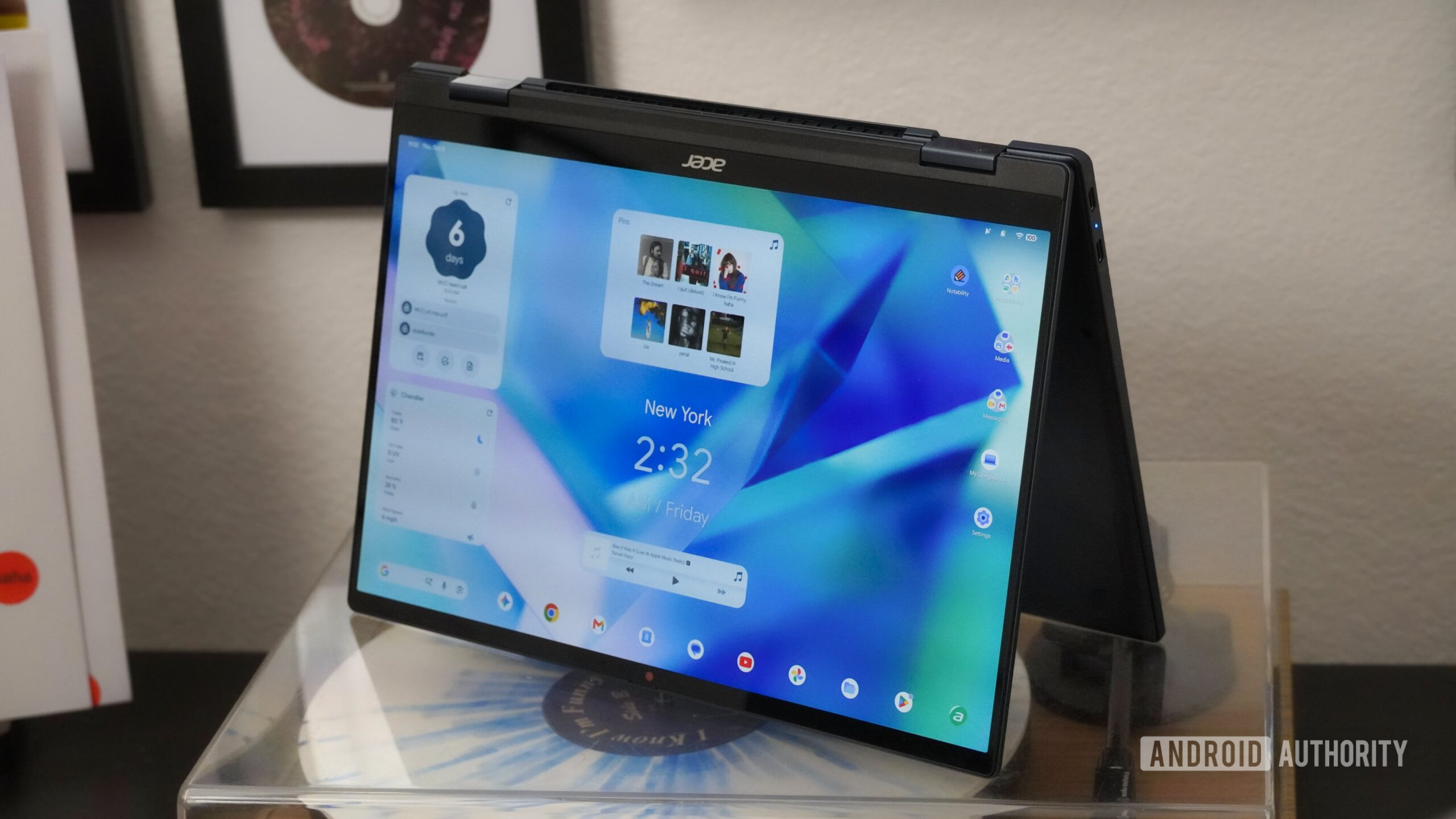
A reviewer switched to an Acer Googlebook 14 as their main work computer and spent the first 48 hours dealing with problems.
They described downgrades from ChromeOS, issues with the Chrome browser and bugs in the “Better Together” features.
But they found that Googlebook OS works especially well with a touchscreen.
Its large icons and controls make it easier to tap menus, adjust settings and move or resize windows.
The system is based on Android’s desktop mode, and its touch-friendly design also works alongside a keyboard and mouse.
The reviewer said the Acer model was the first convertible laptop they had tested that could also serve as a tablet.
The review does not say what changes or fixes may come next.

An Android Authority reviewer says Googlebook OS is more touch-friendly than ChromeOS, macOS and Windows.
The reviewer tested the Acer Googlebook 14 as their only work machine.
They say its large app icons and window controls make common tasks easier to do by touch.
The reviewer also reports downgrades, browser problems and bugs with the “Better Together” feature.
The Acer model they tested is the only convertible Googlebook they mention.
- Who
- Android Authority reviewer Brady Snyder.
- What
- Snyder says Googlebook OS is especially well suited to touchscreen use, while also describing problems with the system.
- When
- The review was published on 2026-10-12.
- Where
- On the Acer Googlebook 14.
- Why
- Its Android-based interface has large, easy-to-press icons and controls, Snyder says.
This story does not have two clearly opposing sides.
Snyder says the Acer Googlebook 14 arrived.
Android Authority published Snyder’s review after 48 hours of using the Googlebook.
- Test device
- Acer Googlebook 14
- Use period
- 48 hours
- Touchscreen support
- Every Googlebook has a touchscreen, according to Snyder
- Convertible model
- The Acer Googlebook Snyder tested was the only convertible he mentions
What people are saying
it’s the most touch-friendly desktop operating system I’ve ever used
this is the first one that could actually pull double duty as a tablet for me.
This is a basic example of Googlebook OS at its best — it’s intuitive regardless of whether you use touch, keyboard, or mouse input.
Sources
Related news

Google launches Fitbit Edge with GPS, health tracking and replaceable battery
Samsung brings Android 17 update to Galaxy S24 and Z Fold 6 in the US
Nothing begins stable Android 17 rollout for Phone (3)
Citroën unveils electric 2CV concept, with production planned for 2028

Apple lets customers prepare iPhone Duo pre-orders in advance
Beats and Pokémon tease a Beats Pill speaker collaboration
Valve releases Steam Frame CAD files, prompting a wave of DIY accessories

Next iPad mini may cost about $799, up from $599

Nvidia reportedly stops making GeForce RTX 5090 cards
Alpine unveils A310 Vision concept, but makes no production commitment

MagSafe wallet uses a side button to fan out up to three cards
