1 hr ago
Logitech MX Keypad Brings AI Agent Control to Developers
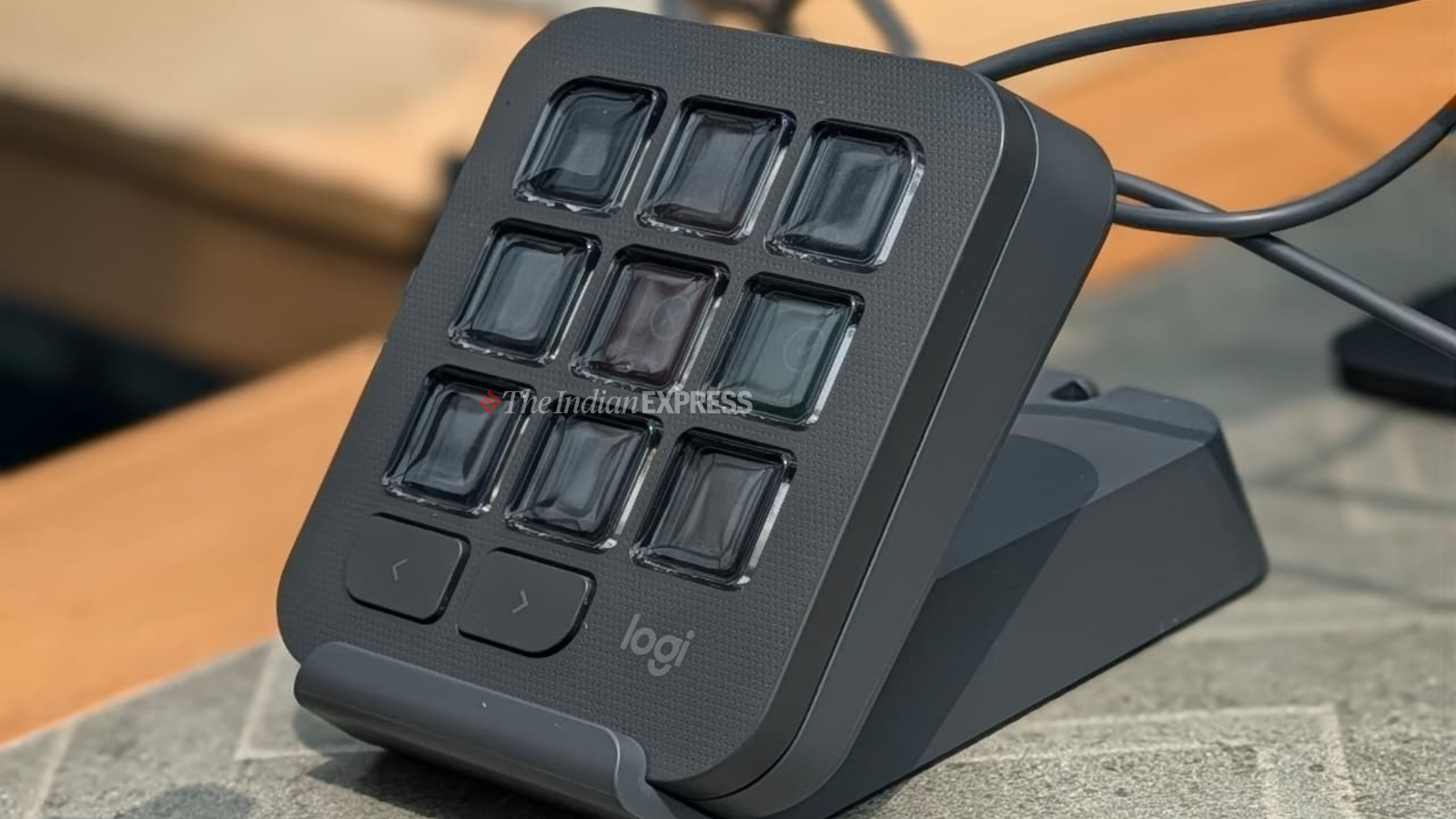
Logitech made a small keypad for people who write computer code.
Its buttons can control AI helpers that assist with coding.
The keypad can work with several apps, including GitHub Copilot and Visual Studio Code.
Each button has a small screen that can change to show what it does.
The screens can also show whether an AI helper is working or finished.
Users can set up shortcuts for commands, screenshots, voice dictation, and other tasks.
This means they may not need to remember as many keyboard shortcuts.
Logitech says the device can help people watch several AI helpers while doing other work.
The MX Keypad connects with USB-C and costs Rs 15,999 in India.

Logitech launched the MX Keypad as a physical control center for managing AI coding agents and shortcuts.
The device offers 15 pages of nine dynamic LCD buttons, providing 135 customizable shortcuts.
It supports workflows across GitHub Copilot, Claude Code, Visual Studio Code, and IntelliJ IDEA.
The keypad displays agent statuses such as “thinking” and “complete” and enables direct prompt confirmations.
It launches in select markets including India, the United States, and the United Kingdom, priced at Rs 15,999 in India.
- Who
- Logitech International SA and its MX product team, working with GitHub, developed the MX Keypad for developers and other advanced users.
- What
- A standalone keypad with dynamic LCD buttons for controlling shortcuts, applications, and multiple AI coding agents.
- Where
- It is available in select markets, including India, the United States, and the United Kingdom; Logitech discussed the product from Helsinki, Finland.
- When
- The MX Keypad launched on Tuesday; the article does not provide a calendar date.
- Why
- To make it easier to manage AI agents, access application-specific commands, and monitor tasks without relying solely on a keyboard, mouse, or additional software tab.
Key facts
- India price
- Rs 15,999
- Controls
- 15 pages with nine LCD buttons per page, totaling 135 customizable shortcuts
- Supported tools
- GitHub Copilot, Claude Code, Visual Studio Code, and IntelliJ IDEA
- Connectivity
- USB-C
- Operating systems
- macOS 13 or later and Windows 10 or later
- GitHub offer
- Three free months of Copilot Pro+ for new and existing users through Logi Options+
- Design basis
- A nine-key LCD keypad derived from the keypad component of Logitech MX Creative Console
Quotes
Valeriya Kostyukovskaya
Global Business and Marketing Manager for MX at Logitech
“We noticed that having a dedicated standalone device that gives you quick access to certain tools, shortcuts, and automations is psychologically easier for users than having to remember those shortcuts”
 indianexpress.com
“If the agent is running in the background, developers can do something else in the meantime. They can document, they can research, they can communicate, or have a meeting.”
indianexpress.com
Sources
Related news

xAI and Cursor Unveil Grok Bot iPhone and Mac App

Grok Bot Can See, Click and Type in Early Beta

Meta's Muse Code coding agent beats Grok, Gemini on benchmark

Anthropic Introduces Standard for AI-Controlled Physical Equipment
SpaceXAI Unveils Grok Bot, a Team of AI Agents
Meta AI Launches Dedicated Mac App With New Tools