Archive · 4 Nov 2025
Apple Releases iOS 26.1 With New Liquid Glass Options and App Enhancements
Apple has a new software update called iOS 26.1.
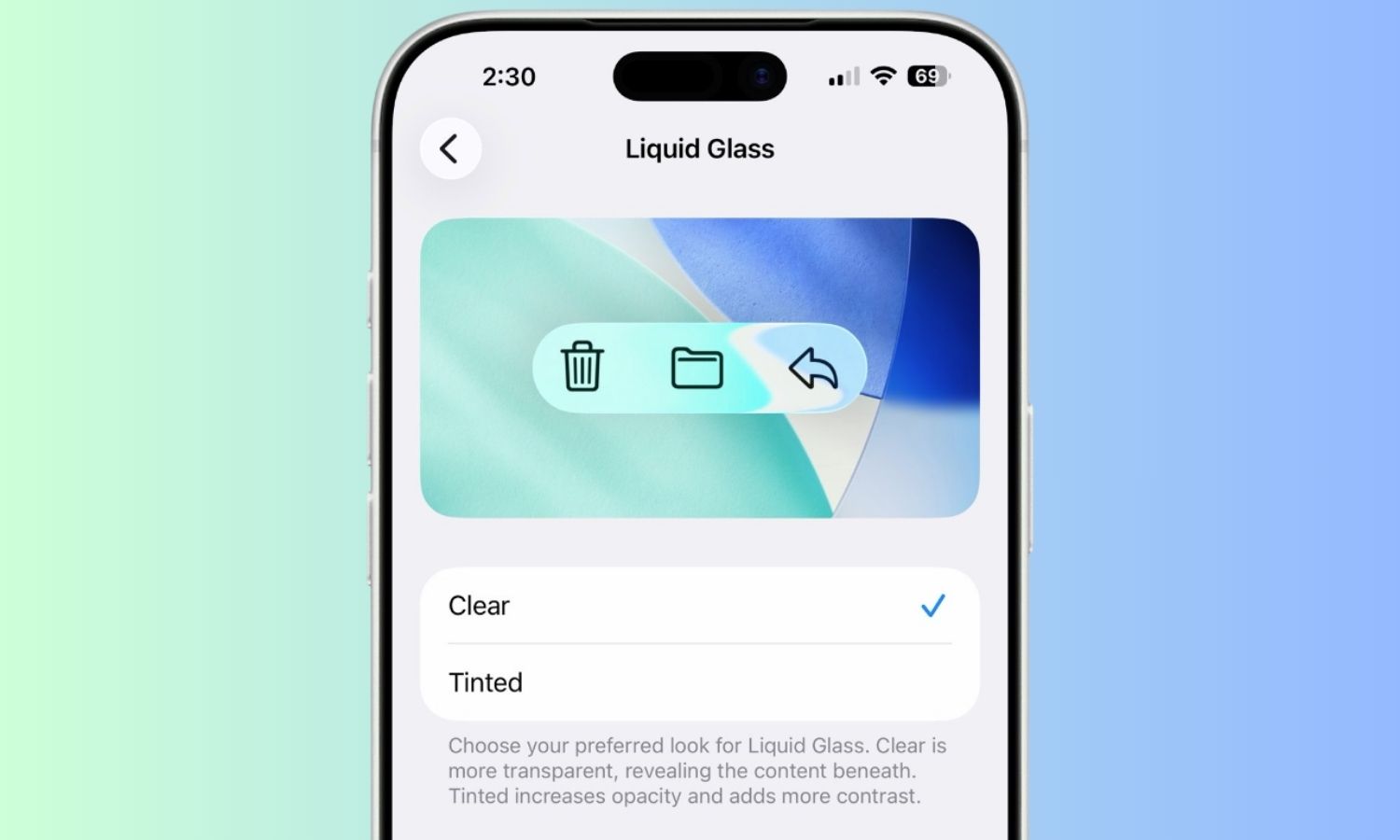
It lets you change how the 'Liquid Glass' design looks.
You can now choose between a clear look or a tinted look that's easier to see.
The update also makes it easier to skip songs in the Music app by just swiping, and music can play wirelessly on more devices.
They also improved the sound quality on FaceTime calls when your internet isn't super fast.
This update is also coming to iPads, Macs, Apple Watches, and other Apple devices.

iOS 26.1 introduces a transparency toggle for Liquid Glass, offering Clear and Tinted options for enhanced contrast and legibility.
A new swipe gesture in the Apple Music MiniPlayer allows for quick skipping of tracks.
Apple Music AutoMix now supports playback over AirPlay.
Users can enable or disable the Lock Screen swipe-to-open Camera feature through a new setting.
The update includes improvements to FaceTime audio quality in low-bandwidth conditions and general performance enhancements.
- Who
- Apple
- What
- Released iOS 26.1 with a new transparency toggle for Liquid Glass (Clear and Tinted options), along with other app and system enhancements.
- When
- Recent
- Where
- Across Apple's device ecosystem (iOS, iPadOS, macOS, watchOS, visionOS, tvOS)
- Why
- To provide users with more customization options for the Liquid Glass design and improve overall user experience and performance.
Clear
Tinted
Liquid Glass Appearance
Clear
Retains the current transparent look.
Tinted
Adds more opacity and contrast.
- Software Update
- iOS 26.1
- New Feature
- Liquid Glass transparency toggle (Clear and Tinted options)
- Other Enhancements
- Music MiniPlayer swipe gesture, AutoMix over AirPlay, Lock Screen Camera toggle, improved FaceTime audio
- Updated Platforms
- iOS, iPadOS, macOS, watchOS, visionOS, tvOS